 Detent Point
Plans & pricing
The paid tiers do the certificate work: bind, trust, register, authenticate, verify. A purchase issues and emails your licence automatically, and it verifies offline — no licence-server call, no phone-home. The twelve read-only audit tools stay free, no licence, no payment.
No licence needed.
- All twelve read-only audit tools (full list below)
- Estate-wide inventory across every certificate surface
- Runs locally, stdio, PowerShell
- Works with Claude Code or any MCP client
- No licence key, ever
For one person.
- Adds the four atomic tools: bind the TLS cert for SQL Server and for Reporting Services, distribute client trust, register an Always Encrypted column master key (full list below)
- Licensed for one person
- Covers 2 servers at a time
- Everything in Free
For a team.
- Adds the full Reporting Services reserve → bind → restart → verify orchestrator, plus endpoint certificate authentication — set, export, and grant (full list below)
- Licensed for your team
- Covers 25 servers at a time
- Everything in Starter
Every tool, unlimited servers.
- Same tool access as Professional — the difference is capacity
- Covers unlimited servers
- Everything in Professional
An encrypted backup is useless without the certificate that encrypted it, and that certificate lives on the server you just lost. SqlCertForge v2 ships the full TDE certificate lifecycle — create, escrow, restore, rotate — and we proved the disaster-recovery round trip on real servers rather than asserting it: a TDE-encrypted database backed up on one instance fails to restore on a second, restoring its certificate first recovers it, and the same backup then restores online with the original data readable. The free audit tells you today whether your TDE certificate’s private key has a backup at all. How TDE certificate backup works →
Starter covers 2 servers at a time and Professional covers 25; Enterprise covers unlimited servers. The count is servers in active use — only what you are currently managing. Re-running against a server already under management never takes a second place, and a server that goes unused for 90 days drops off the count on its own, no action needed. Read-only tools are free and never count against the limit.
Free, read-only: inventory and check what’s bound today, across every certificate surface. Nothing here changes anything.
| Tool | What it does |
|---|---|
get_sql_cert_inventory | Estate-wide inventory of every certificate surface — engine binding, Reporting Services, TDE, backup encryption, endpoints, cell-level — one row per certificate, with expiry |
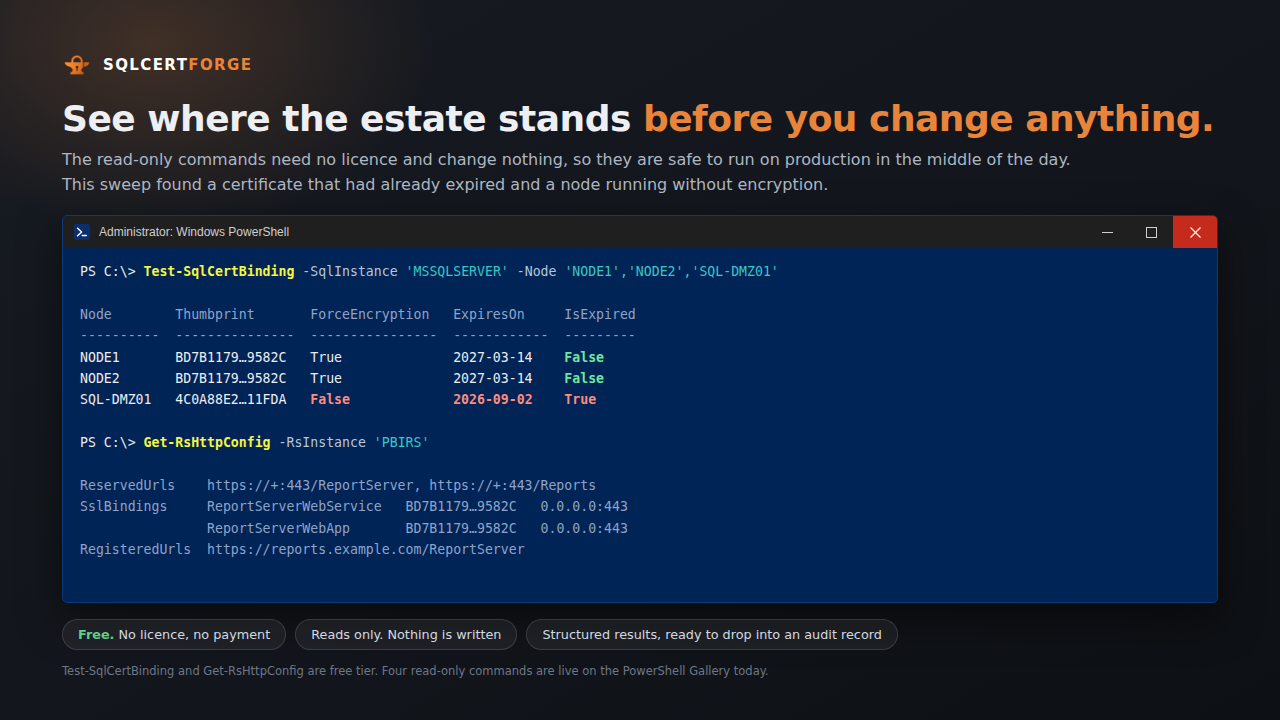
test_sql_cert_binding | Report the TLS cert bound to a SQL Server instance from the registry: thumbprint, ForceEncryption, expiry |
test_rs_cert_binding | Report the TLS cert bound to a Reporting Services endpoint via WMI |
get_rs_http_config | Inventory a Reporting Services HTTPS surface: reserved URLs, SSL bindings, registered URLs |
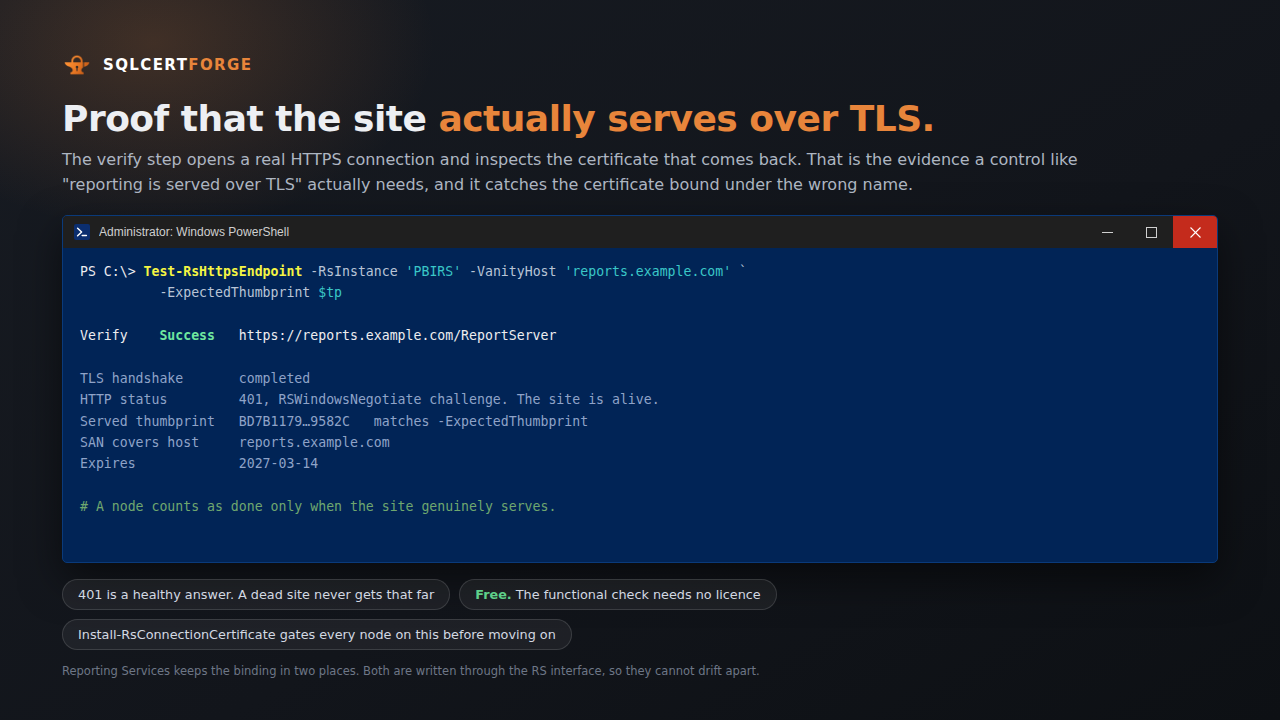
test_rs_https_endpoint | Confirm an RS endpoint actually serves over HTTPS, GET it, validate the served cert’s SAN and thumbprint |
test_sql_tde_configuration | Report Transparent Data Encryption status: database master key, TDE server certificate, whether its private key is backed up, which databases are encrypted |
test_sql_backup_encryption_readiness | Report whether the instance can encrypt backups: a backup-encryption certificate is present and its key backed up |
test_sql_endpoint_cert_auth | Report a mirroring / Always On or Service Broker endpoint’s certificate-authentication state: which certificate, and its expiry |
test_sql_column_master_key | Report Always Encrypted column master keys for a database: key store provider, key path, dependent column-encryption-key count, and whether a certificate-store key is present here |
test_sql_cell_key_hierarchy | Report the cell-level encryption hierarchy: certificates, the symmetric keys they protect, and which principals may use them |
test_sql_polybase_certificate | Report PolyBase scale-out readiness from the DMVs: compute node ids, names, and addresses |
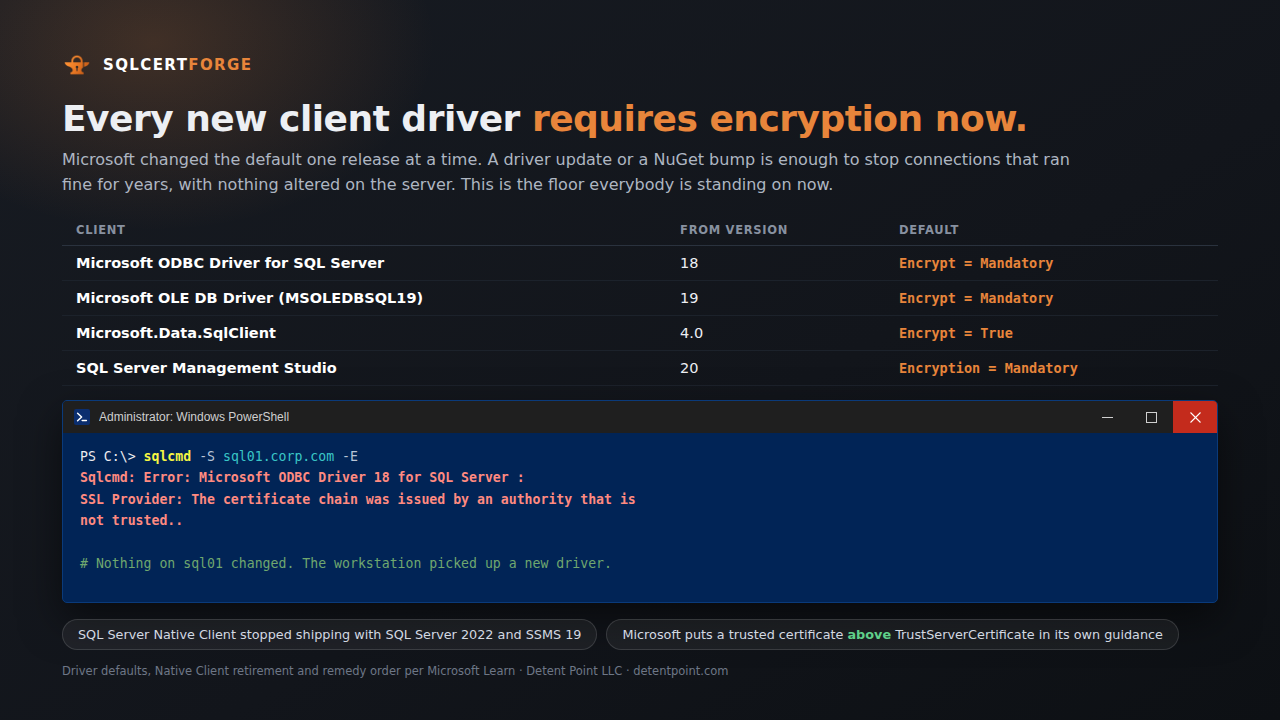
test_sql_cert_client_trust | Report whether a certificate’s issuer is trusted in LocalMachine\Root on a client — the trust a driver needs to validate a SQL Server TLS certificate |
Paid, state-changing: these bind, trust, register, and authenticate. On Reporting Services they also restart. Called without a licence, each returns a clear message saying so instead of a bare error.
| Tool | Tier | What it does |
|---|---|---|
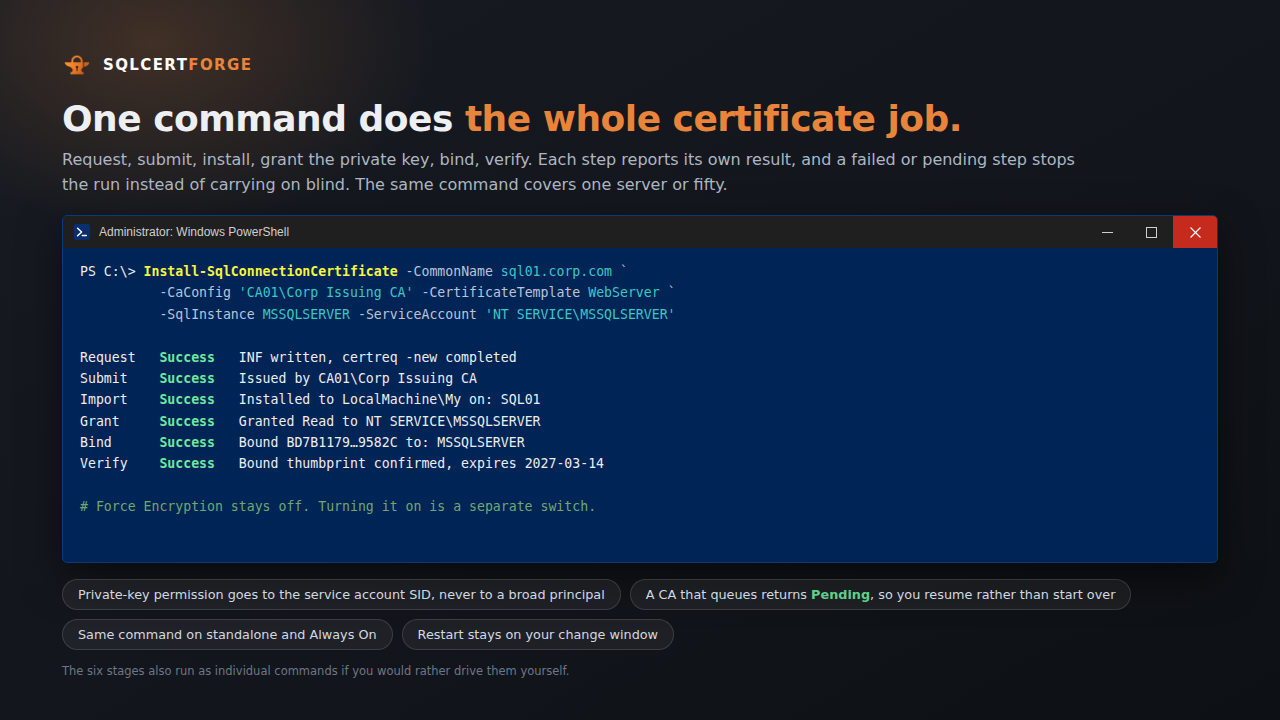
set_sql_cert_binding | Starter+ | Bind a cert to a SQL Server instance via the registry. Applies on the next SQL Server restart, which you run |
set_rs_cert_binding | Starter+ | Bind a cert to a Reporting Services endpoint via WMI |
add_sql_cert_client_trust | Starter+ | Import a certificate’s issuer into LocalMachine\Root on a client, so it trusts certificates that issuer signed |
register_sql_column_master_key | Starter+ | Register an Always Encrypted column master key against a certificate in a key store — the metadata step. Column encryption keys are created with the SqlServer module |
install_rs_connection_certificate | Professional+ | Full orchestration for Reporting Services: reserve the URL, bind, restart, then verify it actually serves |
set_sql_endpoint_cert_authentication | Professional+ | Ensure a mirroring / Always On or Service Broker endpoint authenticates with a given local certificate — creating it with certificate authentication when absent, idempotent when already so |
export_sql_endpoint_certificate | Professional+ | Export an endpoint’s public certificate — no private key — to hand to a partner replica |
grant_sql_endpoint_cert_access | Professional+ | Import a partner replica’s public certificate, create a login from it, and GRANT CONNECT on the endpoint — the trust half of certificate-authenticated mirroring |
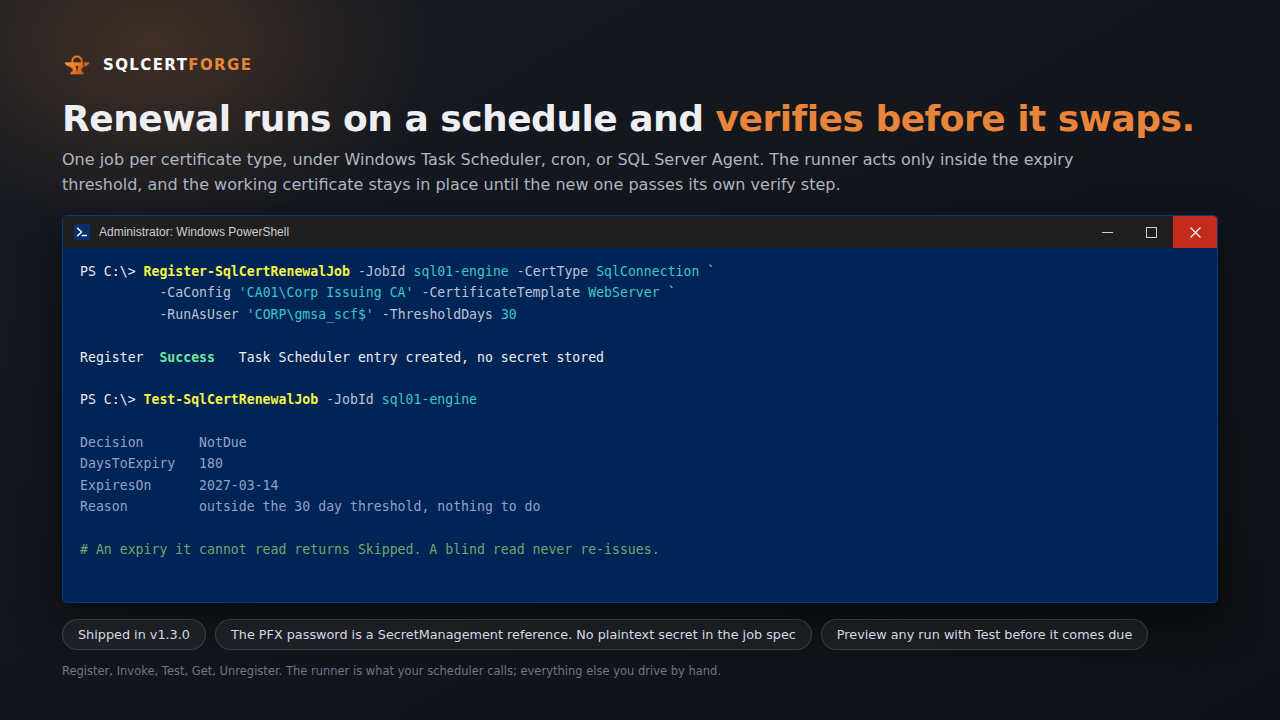
SqlCertForge acts on your SQL Server or Reporting Services host, locally or on a remote node over -Node / -Credential. It runs on Windows PowerShell 5.1 or PowerShell 7 — either is enough. Windows Server ships with 5.1, so a locked-down SQL host needs no new PowerShell install.
Everything it talks to is inside your network — your certificate authority, your SQL Server and Reporting Services hosts, your own report URLs — and it makes no outbound internet calls at run time. Licences verify offline: no licence-server call, no phone-home, no telemetry.
- Inventory first: point it at an instance and the read-only tools report every certificate surface — the binding, TDE, backup encryption, endpoints, Always Encrypted, cell-level, PolyBase — with expiry. This is free, changes nothing, and is safe against production
- Change what you decide to: bind a TLS cert (a registry write for SQL’s
SuperSocketNetLib, or a WMI call and URL reservation for RS), distribute client trust, register an Always Encrypted column master key, or set certificate authentication on an endpoint. On Reporting Services it then restarts the service; on the SQL engine the binding applies on the next restart, which you run - It checks its own work: for Reporting Services it hits the endpoint over HTTPS and reads back the served certificate’s thumbprint, rather than trusting the bind returned success. For the SQL engine it reads the binding back from the registry. For an endpoint it reads back the authentication state. That is the evidence, not the return code
PowerShell, stdio, local only
The twelve read-only tools, running as a local PowerShell MCP server. No licence, no payment, no network calls beyond the SQL/RS host you point it at.
Install-Module SqlCertForge.Audit — the module ships the read-only audit commands and the MCP server, and runs on Windows PowerShell 5.1 or PowerShell 7.
C#, stdio or hosted
The same read-only tools stay free; the eight state-changing tools need a licence to run. Runs locally over stdio, or hosted for a team.
dotnet tool install --global DetentPoint.SqlCertForge.Mcp — then save the .lic emailed after purchase and point SQLCERTFORGE_LICENSE_FILE at it.
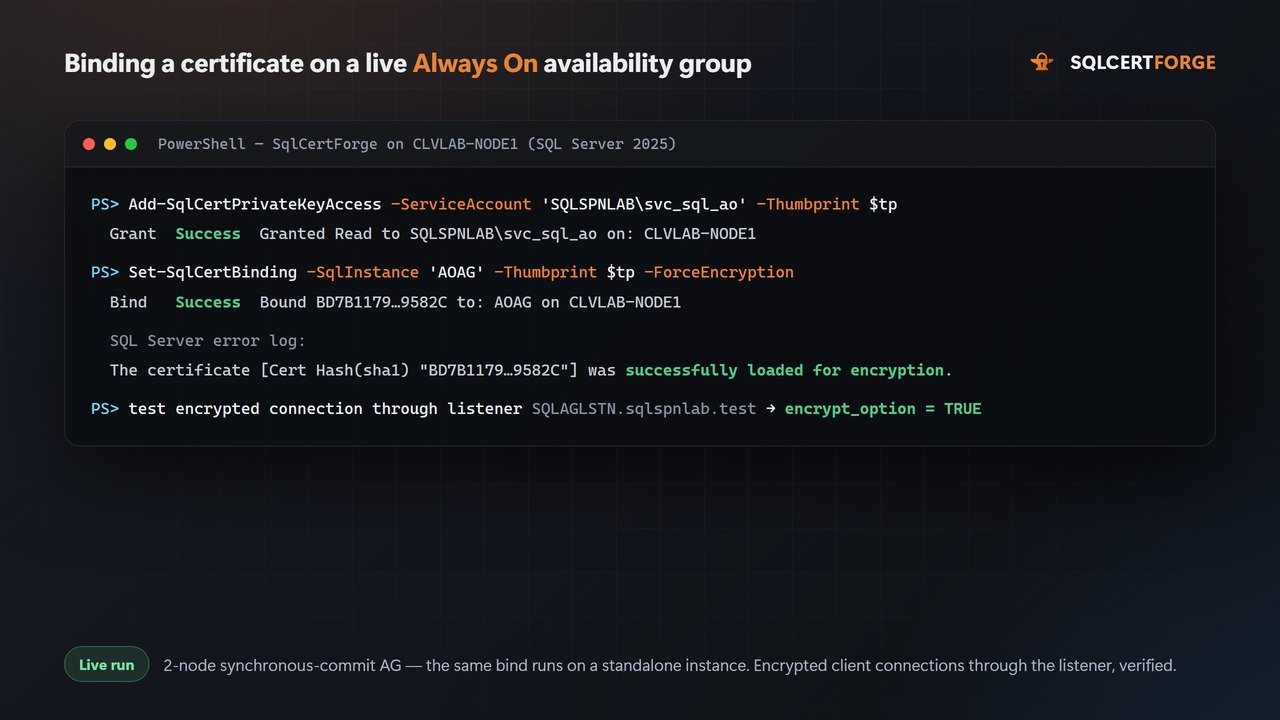
SqlCertForge binds the TLS certificate on each Always On replica — the same per-instance operation it runs on a standalone server. Verified live against a two-node synchronous-commit availability group: encrypted connections through the listener kept working across a manual failover. It does not build the availability group or create the listener; point it at replicas that already exist.
SqlCertForge registers and audits the column master key — the certificate-backed outer key, and the metadata that points the database at it. It does not create column encryption keys or encrypt columns; that cryptography is done with the SqlServer module, which is where it belongs.
The endpoint tools set certificate authentication on a mirroring / Always On or Service Broker endpoint, export the public certificate, and grant a partner CONNECT — the certificate-trust half of a cross-node session. Proven live: a certificate-authenticated mirroring session between two instances reached SYNCHRONIZED, and a Service Broker message crossed between them over the same trust. It does not build the mirroring or availability-group topology itself.
SqlCertForge reports PolyBase scale-out readiness — the compute nodes and their addresses, read-only. It does not manage the internal PolyBase scale-out certificates; that is SQL Server’s own to rotate.
The test suite runs on both Windows PowerShell 5.1 and PowerShell 7, covering the cert-surface logic, and the C# MCP layer carries its own suite: tier-to-tool mapping, the licence gate including real RSA sign / verify / tamper / expiry cases, and Stripe webhook signature verification. All state-changing tools have been exercised live against real SQL Server — SQL Server 2022 and SQL Server 2025, SSRS, and Power BI Report Server. Live validation is not a formality here: it surfaced and fixed six real defects that mocked unit tests could not catch, including SQL Server 2025 reporting a certificate’s type as CERTIFICATE_OAEP_256 rather than CERTIFICATE. Proven end to end: a TDE-encrypted database backed up on one instance and recovered on another by restoring its certificate first; a certificate-authenticated mirroring session reaching SYNCHRONIZED across two nodes; a client connection that fails untrusted and succeeds once the issuer is distributed; and a cell-level encrypt/decrypt round-trip.
Every command has a reference page with several views — written for management, practitioners, and learners, plus software-approval, dependency, and compliance lenses, with worked recipes that use only real parameters. The same content ships as a single adoption guide.
Command reference → · Adoption guide → · The guide as a PDF →
Guides by problem: TrustServerCertificate → · TDE certificate backup → · Restoring encrypted backups → · Always Encrypted CMKs → · Endpoint certificate auth → · Certificate expiry inventory →
SqlCertForge is available through multiple channels. The free audit module is on the PowerShell Gallery. The paid tiers are available direct from Detent Point via the links above, or through the marketplaces below.
PowerShell Gallery → · AWS Marketplace → · Azure Marketplace →
SqlCertForge.MCP is one of a line of single-purpose MCP servers, alongside ClusterValidator.MCP and PesterForge.MCP.